
The Art of Illustration
Elevating Design Through Visual Storytelling
In a digital world often dominated by stock photography and minimalist UI, custom illustration has emerged as the “soul” of modern branding. It’s no longer just decoration; it’s a strategic tool used to communicate complex ideas, evoke emotion, and build a unique identity.
Whether you are a designer, a brand owner, or a curious creative, understanding how to balance aesthetics with utility is key to mastering the medium.
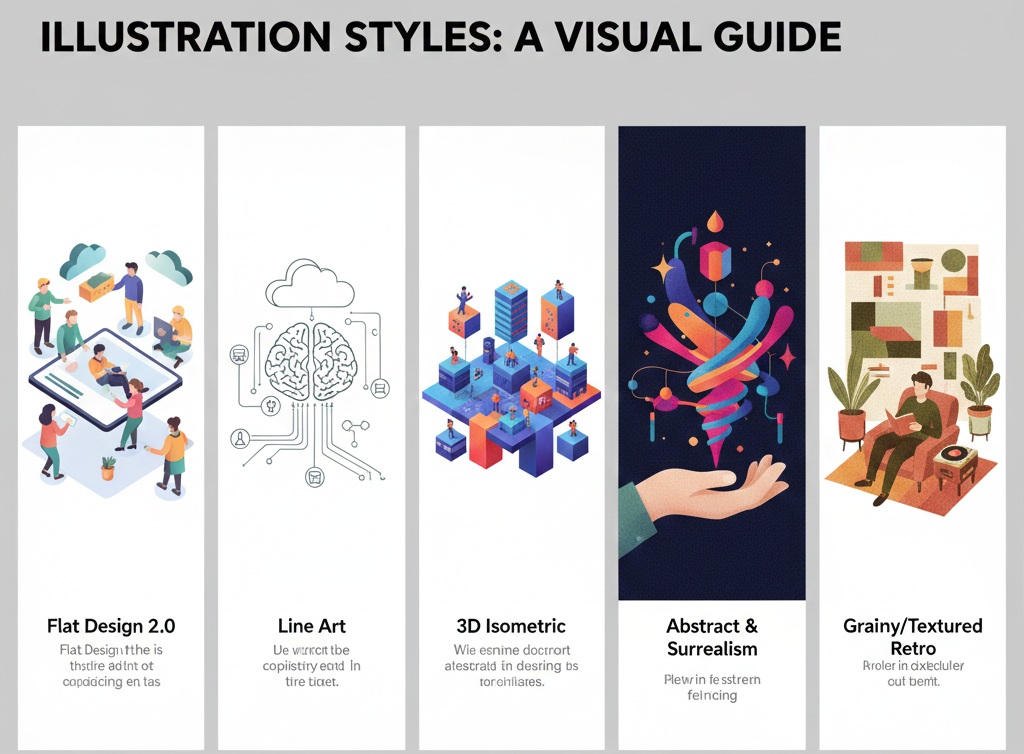
1. Popular Illustration Styles & Aesthetics
The “look” of your illustration sets the emotional tone for your entire project. Here are the most influential styles in the current design landscape:
Flat Design 2.0: A evolution of the classic flat look, adding subtle gradients and shadows for depth. It’s clean, professional, and highly scalable.
Line Art: Minimalist and sophisticated. Using varying stroke weights can make a design feel modern and “editorial.”
3D Isometric: Perfect for tech and SaaS brands. It allows you to show complex systems or environments from a bird’s-eye view while maintaining a playful, tactile feel. The Art of Illustration
Abstract & Surrealism: Using exaggerated proportions and dream-like colors to represent “feelings” rather than literal objects.
Grainy/Textured Retro: Incorporating noise and grit to mimic mid-century print techniques, adding warmth and a “human touch” to digital interfaces.
2. Strategic Usage: Where Illustrations Shine
Illustrations shouldn’t just be “plopped” onto a page. They should serve a specific functional purpose:
Hero Sections
First impressions matter. A custom hero illustration can explain a unique value proposition faster than a paragraph of text. It creates an immediate visual hook that sets you apart from competitors using the same stock photos.

Onboarding & User Education
Abstract concepts—like “cloud computing” or “end-to-end encryption”—are hard to photograph. Illustrations can simplify these metaphors, guiding users through a flow without overwhelming them. The Art of Illustration
Data Visualization
Charts and graphs don’t have to be boring. Adding illustrative elements to data makes the information more digestible and engaging, turning dry statistics into a narrative.
3. Best Practices for Implementation
To make illustrations work effectively within a design system, keep these three principles in mind:
Consistency is King: Ensure your line weights, color palettes, and corner radiuses match. A mix of styles feels cluttered and unprofessional.
Accessibility: Never rely on illustration alone to convey vital information. Use alt-text and ensure the color contrast is high enough for visually impaired users.
White Space: Let your artwork breathe. Crowding an illustration with too much text or other elements diminishes its impact. The Art of Illustration
4. The Future: AI and Motion
The landscape is shifting. We are seeing a massive rise in Animated Illustrations (Lottie files), which add a layer of interactivity and delight. Additionally, AI-assisted workflows are helping designers iterate on concepts faster, though the “human element” remains the most valued asset in high-end branding.
“A good illustration doesn’t just show you something; it makes you feel the way the brand wants you to feel.”
1. The Psychology of Color & Shape
Aesthetics aren’t just about what looks pretty; they are about how the brain processes information. The Art of Illustration
Geometric vs. Organic Shapes: * Geometric (Squares/Triangles): Convey stability, efficiency, and tech-savviness. Great for Fintech or B2B SaaS.
Organic (Curvy/Hand-drawn): Convey empathy, creativity, and accessibility. Ideal for wellness brands, non-profits, or education.
The “Human” Factor: In UX design, adding a human figure to an illustration creates a “mirror effect.” If the character looks relaxed using your product, the user subconsciously feels that your product is easy to use.
Color Theory in Context: Using a “Pop” color for the action-oriented part of an illustration (e.g., a bright orange button within a muted blue illustration) subconsciously trains the user on where to look and what to do next.
2. Technical Execution: SVG vs. Lottie vs. PNG
Choosing the right format is vital for performance and aesthetics.
| Format | Best For… | Why? |
| SVG | Icons & Flat Illustrations | Infinite scalability without losing quality; tiny file sizes; can be styled with CSS. |
| Lottie (JSON) | Interactive Animations | High-quality animation with 1/10th the file size of a GIF. Perfect for “success” checkmarks or loading screens. |
| WebP/PNG | Textured or 3D Art | Necessary for illustrations with complex shadows, grain, or depth that SVGs can’t handle efficiently. |
Pro Tip: Always run your SVG files through a tool like SVGOMG to strip unnecessary metadata, which can reduce file sizes by up to 60%.
3. Creating a “Design System” for Illustrations
If you are scaling a brand, you can’t just draw one-off images. You need an Illustration Library. This ensures that an illustration on your “About” page feels related to the one in your mobile app.
The Component Method: Break illustrations down into “sets.” Create a set of heads, bodies, hands, and props. This allows you to “kit-bash” new scenes quickly while maintaining perfect stylistic consistency.
Perspective Rules: Decide early on—is your brand Flat (2D), Isometric (2.5D), or Perspective (3D)? Mixing these creates “visual friction” that makes a site feel unpolished.
The 70/30 Rule: Use your primary brand colors for 70% of the illustration and a set of secondary/accent colors for the remaining 30%. This prevents the artwork from looking like a generic rainbow and keeps it “on-brand.” The Art of Illustration
4. Usage: Bridging the Gap Between Art and UI
Where many designers fail is making the illustration too distracting.
Contextual Relevance: An illustration of a rocket ship is a cliché for “growth.” To go in-depth, try a more specific metaphor. If your software helps with “team communication,” show a bridge being built or a complex knot being untied.
Negative Space Integration: Modern aesthetics often involve “breaking the box.” Let parts of the illustration bleed out of their container or interact with the text. This makes the layout feel organic rather than rigid.
Micro-Interactions: Aesthetic delight comes from the small things. Imagine a small “hover” effect where a character’s eyes follow the cursor, or a plant sways slightly. This turns a static page into a living experience. The Art of Illustration
Case Study: Slack vs. Notion
Slack uses high-energy, colorful, and diverse character illustrations to emphasize collaboration and energy.
Notion uses black-and-white, hand-inked, “vintage-intellectual” sketches to emphasize thoughtfulness and minimalism.
Both are successful because their illustration style is a direct reflection of their brand personality. The Art of Illustration
The Humanist Tech aesthetic.
This style balances the precision of technology with the warmth of human touch.

1. The Visual DNA: “Soft-Modernism”
The goal is to avoid the “corporate Memphis” cliché (overly long limbs, purple skin) and instead move toward something more grounded and textured.
Core Aesthetic Traits
Linework: Medium-weight, “graphite” grey lines (never pure black) with slightly rounded terminals to feel friendly. The Art of Illustration
Perspective: Dimetric (slight 3D tilt) to give depth without being as rigid as technical Isometric. The Art of Illustration
Texture: Subtle Gaussian noise or “stipple” shading in the shadows to give it a print-like, premium feel. The Art of Illustration
Character Style: Realistic proportions but simplified features. No facial details (eyes/mouths) to keep it universal, focusing instead on body language.
2. The Color Palette: “Deep Sea & Sunset”
This palette uses “Cold” colors for stability and “Warm” colors for the human elements/action points.
| Element | Color Name | Hex Code | Purpose |
| Primary | Midnight Navy | #1A2238 | Lines, text, and structural elements. |
| Secondary | Digital Blue | #4E67EB | Tech elements (screens, data, wires). |
| Accent | Terracotta | #E87D67 | Human skin tones, “Action” buttons, highlights. |
| Neutral | Soft Mist | #F4F7FA | Background shapes and negative space. |
| Support | Ochre Gold | #D4AF37 | Secondary accents (lightbulbs, stars, sparks). |
3. Component & Character Rules
To ensure any designer can replicate this style, follow these constraints:
The Human Figures
Attire: Minimalist “Smart Casual” (tucking in shirts, simple sneakers). Avoid trendy clothing to prevent the art from looking dated in a year.
Movement: Characters should always be interacting with something. Never just standing still. They should be holding a tablet, pointing at a chart, or “lifting” a data block. The Art of Illustration
The Environment
Floating Elements: Use “floating” UI elements (small windows, nodes, or icons) around the characters to signify the digital layer.
Flora: Integrate 1–2 organic leaf shapes in the background of tech-heavy scenes to maintain the “Humanist” balance. The Art of Illustration
4. Usage Guide (The “When & Where”)
For High-Value Conversions (Pricing/Sign-up): Keep illustrations small and peripheral. The focus should be on the numbers and the “Buy” button.
For Empty States (No Data/404): This is where you can be whimsical. Use a character looking through a telescope or a “broken” but cute mechanical gear.
For Blog Headers: Use the Full Scene style with a background. Ensure the “Safe Zone” for text is on the left 40% of the image. The Art of Illustration
5. Implementation Checklist
[ ] Stroke Check: Are all lines 2px or 4px (Avoid random widths). The Art of Illustration
[ ] Corner Radius: Are all rectangles rounded to exactly 8px?
[ ] Export: SVGs for web, 300dpi PNGs for print decks.
To understand why the human brain is “satisfied” by certain designs, we have to look past the surface level. Satisfaction in design isn’t just about beauty; it’s about cognitive ease—the brain’s way of saying, “I understand this, I trust this, and I don’t have to work hard to use this.”
Here is an in-depth look at how the brain processes design during the decision-making process. The Art of Illustration
1. The Three Layers of Emotional Design
Cognitive scientist Don Norman identifies three distinct levels at which the brain “decides” if a design is satisfying:
The Visceral Level (Pre-conscious): This happens in milliseconds. It’s your gut reaction to colors, shapes, and symmetry. If a design is aesthetically pleasing, the brain’s ventral striatum (reward center) releases dopamine. You feel “satisfied” before you’ve even read a single word. The Art of Illustration
The Behavioral Level (Function): This is the satisfaction of doing. If a button is where you expect it to be or an illustration clearly explains a complex step, your brain experiences a “success signal.” This reduces cognitive load (the mental effort required), which the brain perceives as pleasurable.
The Reflective Level (Meaning): This is the highest level of thought. It’s where you decide if a brand aligns with your identity. Satisfaction here comes from the “story” the design tells—like how a hand-drawn illustration makes a tech company feel “human” rather than cold.
2. The “Halo Effect”: Aesthetics = Trust
One of the most powerful shortcuts the brain takes is the Halo Effect.
The Logic: If something looks high-quality, the brain assumes it works high-quality.
Neuroscience shows that users judge a website’s credibility within roughly 50 milliseconds. If the design is cluttered or “ugly,” the amygdala (the brain’s fear and threat center) can trigger a subtle “avoidance” response. A clean, satisfying design keeps the amygdala quiet and the prefrontal cortex (rational decision-making) engaged.
3. The Psychology of Decision-Making
Designers use specific psychological “satisfiers” to help the brain make choices without fatigue:
A. Hick’s Law (Reducing Choice Paralysis)
The brain hates over-analysis. Every extra choice increases the time and energy needed to decide. A “satisfying” design limits choices to a few clear paths. When a design removes “noise,” the brain feels a sense of relief and control. The Art of Illustration
B. The Default Effect
The brain is biologically wired to conserve energy. We are more likely to accept a “default” option (like a pre-selected subscription tier) because it requires zero cognitive work. A satisfying design uses clear defaults to guide the user smoothly toward a goal. The Art of Illustration
C. Symmetry and “Biophilia”
Evolutionarily, humans are satisfied by symmetry and natural patterns (fractals) because they signify health and safety in nature. This is why modern designs often use Golden Ratio proportions or “Biophilic” elements (plants, organic curves, natural textures). These triggers lower cortisol (stress) and increase user satisfaction.
4. Visual Summary of Design Satisfaction
| Brain Region | Trigger | Response |
| Ventral Striatum | Beautiful colors, clean lines | Dopamine Release: Immediate pleasure/ attraction. |
| Prefrontal Cortex | Clear hierarchy, easy navigation | Cognitive Ease: Feeling of being “in control.” |
| Amygdala | Clutter, sharp edges, confusion | Micro-Stress: Urge to “bounce” or leave the site. |
| Hippocampus | Familiar icons (e.g., home, cart) | Recognition: Trust through familiarity. |
The Bottom Line
A brain is “satisfied” by a design when that design solves a problem with the least amount of friction. Beauty gets the user through the door, but “Cognitive Ease”—the feeling that the interface is an extension of the user’s own thoughts—is what creates long-term satisfaction.
To help you evaluate your own designs or any project you’re reviewing, here is a Neuro-Audit Checklist. These questions target the specific regions of the brain responsible for pleasure, trust, and logic.
🧠 The Neuro-Audit Checklist
| Category | The “Brain” Question | Target Region |
| Visceral | Does the image feel “balanced” (Symmetry/ Golden Ratio) within the first 50ms? | Ventral Striatum |
| Cognitive | Can I understand the “main point” of the illustration without reading any text? | Prefrontal Cortex |
| Emotional | Is there a “Human Touch” (texture, organic shapes, or characters) to build empathy? | Amygdala/ Oxytocin |
| Functional | Is the most important element (the CTA) the highest contrast color in the scene? | Visual Cortex |
| Energy | Have I removed all unnecessary “visual noise” that might cause choice paralysis? | Basal Ganglia |
The “Satis-Function” Map
To visualize how these elements come together, we can map design choices against human psychological needs. A satisfying design lives at the center of Utility, Beauty, and Meaning.
How to apply this to your blog (In-Depth)
If you are writing or designing for a blog, the brain’s “satisfaction journey” usually looks like this:
The Hook (Visceral): Use a Grainy/Textured Retro illustration. The “grit” mimics physical paper, which the brain finds more “real” and trustworthy than sterile digital pixels. The Art of Illustration
The Context (Cognitive): Use 3D Isometric views for your “How-it-works” sections. This provides a “God-view” perspective, making the reader feel like they have total mastery over the topic.
The Flow (Behavioral): Use Line Art for small icons. Because they are lightweight and simple, they don’t distract from the reading experience, allowing the user to stay in a “flow state.”
The Closing (Reflective): End with a surreal/abstract piece that captures the “feeling” of success. This leaves the user with a lasting emotional impression rather than just a list of facts. The Art of Illustration
| Element | Before Audit | After Neuro-Audit | Brain Benefit |
| Compo-sition | Centered / Static | Diagonal Upward Flow | Anti-cipation |
| Complexity | 12 distinct objects | 4 core objects | Reduced Load |
| Color | Mono-chromatic Blue | Blue + Pop of Orange | Attention Focus |
| Surface | Smooth/ Plastic | Grainy/ Matte | Trust/ Authen-ticity |
Part I: The Aesthetic & Usage Matrix
This table connects the visual style to its strategic purpose, ensuring the design satisfies the brain’s need for both beauty and logic.
| Illustration Style | Core Aesthetic | Best Usage | Brain Trigger |
| Flat Design 2.0 | Gradients & Depth | UI On-boarding / SaaS | Cognitive Ease: Familiar and predictable patterns. |
| Line Art | Editorial & Minimal | High-end Branding / Blogs | Sophis- tication: High perceptual fluency (low “noise”). |
| 3D Isometric | “God-view” Perspective | Complex Systems / Data | Mastery: Makes the brain feel in control of the big picture. |
| Abstract/ Surreal | Emotional Metaphors | Creative Blogs / Values | Identity: Connects with the “Reflective” level of thought. |
| Grainy/ Retro | Textured & Organic | Trust-based Services | Authen-ticity: Lowers Cortisol via “Biophilic” textures. |
🧠 Part II: The “Satisfaction” Decision Flow
When a human interacts with your design, their brain follows this exact sequence. To maximize satisfaction, your design must “pass” each gate:
1. The 50ms “Gut Check” (Visceral)
The Goal: Stop the user from leaving.
The Design Fix: Use Symmetry and a Clear Focal Point.
Neuro-Logic: If the image is balanced, the Ventral Striatum releases dopamine, signaling that the environment is “safe and rewarding.”
2. The 500ms “Meaning Check” (Cognitive)
The Goal: Explain the value without reading.
The Design Fix: Use Human Figures performing an action.
Neuro-Logic: Mirror Neurons fire when we see someone else doing a task. If the illustration shows a character “simplifying” a task, the user’s brain feels like it can simplify that task too.
3. The 2-Second “Trust Check” (Emotional)
The Goal: Build a lasting bond.
The Design Fix: Incorporate Imperfection (Grain, hand-drawn lines, or organic “biophilic” shapes).
Neuro-Logic: Perfect, sterile vectors feel “robotic” and trigger the Amygdala’s skepticism. Subtle textures signal human effort, which increases Oxytocin (the trust hormone).
🛠️ Part III: The Visual Style Guide (Neuro-Optimized)
If you are building a new project today, follow these “Master Rules” for a satisfying user experience:
Color Strategy: Use the 60-30-10 Rule. 60% Neutral (Soft Mists), 30% Brand (Deep Navy), and 10% High-Contrast Pop (Terracotta/Gold) for the specific area you want the brain to “decide” on.
Shape Language: Use Rounded Corners (R \ge 8px). The human brain is evolutionarily wired to avoid sharp edges (associated with danger/thorns) and prefer curves (associated with fruit/safety).
Movement: Always imply Upward-Right motion. This aligns with the “Mental Time Line” of the brain, where the future and success are positioned to the right and upward.
🏆 Final Summary: The Satisfied Mind
A design is “satisfied” when the Prefrontal Cortex (logic) and the Limbic System (emotion) stop fighting.
The Secret Formula: > Beauty (Dopamine) + Simplicity (Perceptual Fluency) + Texture (Trust) = Decision Satisfaction.
Free Images, Stock Photographs, illustrations